From the auction lane to the sold line — recon and inventory, your sales floor, in-house financing, the paperwork, and your own website. Every capability below is included, at one flat price.
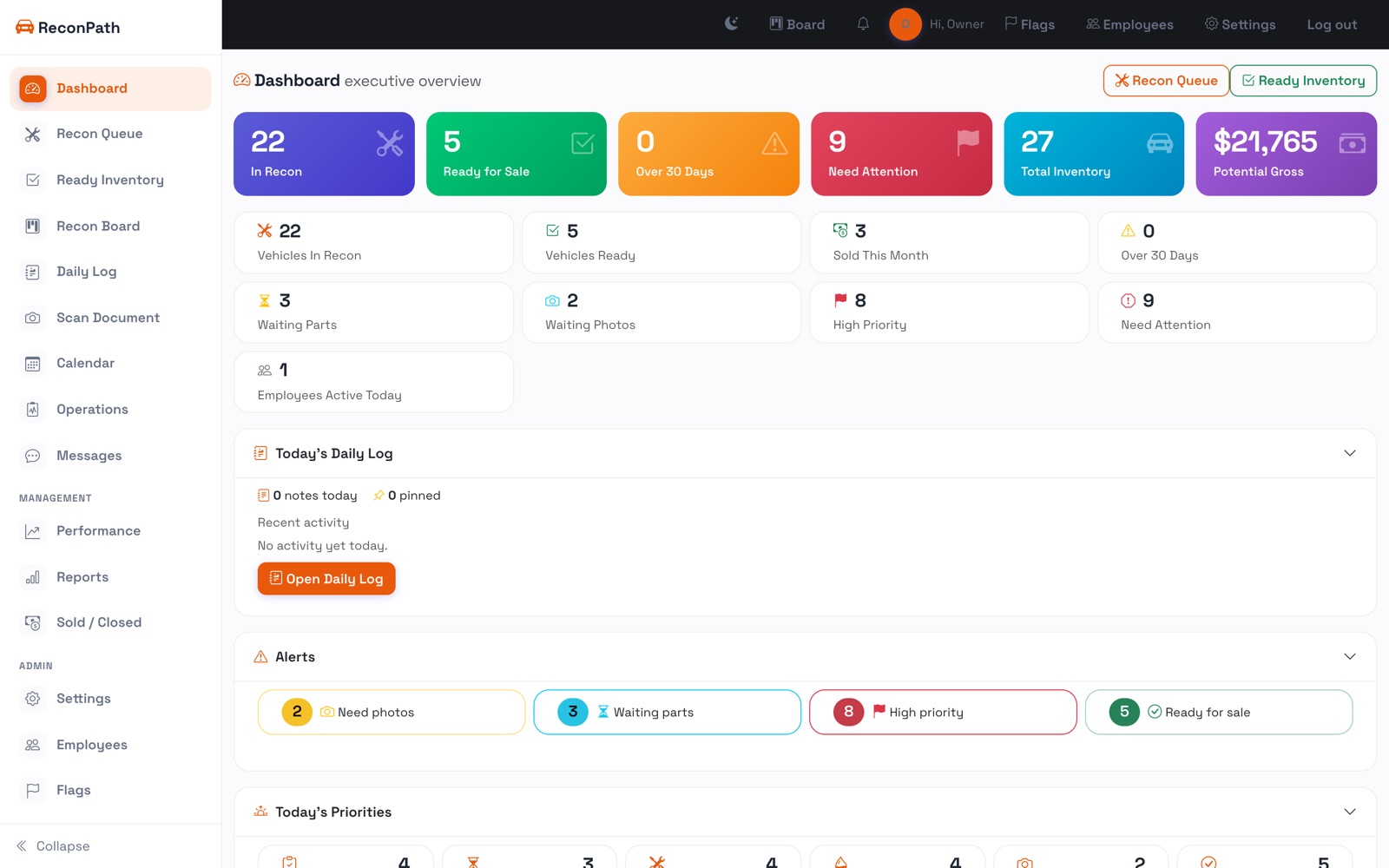
Not a mockup. These are the actual screens your team sees the moment they log in. Use the arrows to click through every part of the app.
yourstore.reconpath.com/dashboardLive app
Step 01
01 / 23
Step 01 / 23
Everything, the second you log in
The dashboard opens on live counts, what needs attention, and the aging on every unit, the whole store in one glance.
The flagship
Recon & inventory
Where ReconPath earns its keep first: get every unit from purchase to the front line, with the days and the dollars on the record.
Recon queue
Every unit, aging in plain sight
One screen shows what's in recon, how long it's been there, and what's holding it up, color-coded the second it goes stale. Guide →
Recon board
Drag the lane, stage by stage
A board of the whole lane. Drag a card from Inspection to Repair to Detail as the work gets done, and status updates instantly. Guide →
18-point inspection
Inspect it on the phone
Walk the car and tap Pass, Needs work or Fail on all 18 points, snapping photos as you go. Open fails block the unit from the front line.
Customer share
Text the buyer the inspection
One tap sends a clean, branded inspection page with results and photos and no login, and a QR on the printout does the same on the lot.
Repair estimates
Approve the work first
Build a line-item estimate and send it up for a manager's sign-off. Approval sets the car's recon budget automatically.
Parts & sub-let
Every part and vendor, with an ETA
Track parts and sub-let jobs per unit and across the lot. Back-orders and anything past its ETA flag red before they stall a car.
Recon budget
Budget vs actual, per car
Set a target and watch real spend climb against it, parts, sub-let and shop costs in one number, green to red. Know the true recon cost before the line.
Time-to-line
Days counted, not guessed
Real time-to-line per unit and per store, plus an aging report, so you can prove the number is dropping and find the days you're losing. Guide →
Close the deal
Sales & paperwork
Turn a lead into a signed, delivered deal without leaving the system, or reaching for a separate CRM and a stack of forms.
Sales CRM
Every lead in one pipeline
Website and walk-in leads become customers in a visual pipeline, with follow-up tasks and a searchable directory. Message a customer by email or text right from the lead.
Deal desk
Structure a deal in seconds
Price, trade-in, tax, fees and a live monthly payment or cash balance. Mark it sold and the vehicle flips to Sold in your inventory automatically.
Paperwork packet
Every form, print-ready
Buyer's Order, Bill of Sale, Odometer Disclosure, Retail Installment Contract, Title & Registration worksheet and We Owe, filled from the deal.
E-signature
Sign in the store or from home
Sign any document on a tablet at the desk, or send a secure link so the customer signs from their couch. Every signature is stamped and stored on the deal.
Credit applications
Captured and lender-ready
A secure online credit app that lands as a customer, with the Social Security number encrypted and every view logged, ready to export to your finance sources.
Customer messages
Never miss a website lead
When a customer messages from your website it lands in the app with a notification, ready to reply, call, or turn into a deal in one tap.
Owner dashboard
Sales, gross & collections
One screen for the owner: units sold, gross, what's in the pipeline, and what's owed on your in-house accounts.
Commissions
Log, approve, pay out
Your team submits commissions, managers approve or reject, and payout is tracked, with a qualifying rule you set. Guide →
Buy-Here-Pay-Here
In-house financing
Carry your own paper. Turn any deal into a loan and run the account for its whole life, right inside ReconPath.
Loans & schedule
A deal becomes a loan in one click
Generate a full amortization schedule from the deal terms, with the down payment, rate and term you set.
Payments & payoff
Track every dollar, to the day
Record payments, see the running balance and due dates, and get an accurate daily-interest payoff any time.
Late fees & reminders
Stay on top of the portfolio
Automatic late fees and email payment reminders, plus a portfolio view of all your accounts with past-due at a glance.
Payment portal
A page for your buyers
Customers see their balance and payment schedule on their own portal, and can pay online where you enable it.
Included free
Your dealership website
Every dealer gets a real car-buying website that stays in sync with your lot, at no extra cost. Learn more · see the live demo.
Live inventory
Your cars, online automatically
Your inventory lists itself, with a page for every vehicle that carries a photo gallery, full specs and a payment estimator. 20 themes, your logo and colors.
Leads built in
Financing, trade-in & test drives
A credit application, trade-in valuation, test-drive booking and a contact form, all wired so every inquiry drops straight into your pipeline.
Your domain
Free address or your own
Launch on the free address we give you, or connect your own domain with automatic HTTPS. Reviews and a contact page with a map, included.
The platform
Team, mobile & the rest
Everything that keeps the whole store on the same page — on the lot, on the phone, and across rooftops.
Native app
Scan a VIN or a license
The iPhone and Android app runs on the lot: scan a VIN to stock a car, scan a driver's license to start a customer, and start a sale standing next to it.
Roles
Owner, manager, mechanic, sales
Each person gets the view and permissions they need, and nothing they don't. Invite a teammate by email and they set their own password. Guide →
Multi-store
One login, every rooftop
Run one store or ten. Switch shops from the top bar and every queue, board and report scopes to that location, at the same flat price.
Documents
Every file on the deal
Store the title, driver's license, insurance and signed forms on the customer and the car, not lost in a folder on someone's desktop.
Notifications
Push to the phone
Assignments, estimate approvals, back-orders and new customer messages land on your phone, so nobody walks the lot to chase an update.
Calendar & log
Nothing slips
Reminders, operations and a daily log on a shared calendar, so title chases, part ETAs and follow-ups don't get lost between people.
Printouts
Buyers Guide & window stickers
Generate an FTC Buyers Guide, a branded window sticker and a recon work order for any unit, print-ready, straight from the car.
Bulk import
Onboard your whole lot
Import inventory from a CSV: columns auto-match, duplicates are skipped, and you review everything before it lands. Export any list back out too.